
Many thanks to Krishna Bhandari
I have 7x performance and both Android phones
Digital key in the app are working fine for both me and my wife’s phone. If this is not working I suggest you try the following
– On the secondary phone, install the app and set up an account for secondary user.
– once this is done, on primary user’s phone, go to vehicle & security and click share vehicle
– Click Create Sharing, enter email, tick T&Cs and click Confirm to Share
– you will receive notification on the secondary user’ phone to accept the invitation. Click on it and it will ask to sign in
or alternatively you can go the settings area and at the top right corner it shows message notification and open the most recent msg, and click Go To which will take you to acceptance screen.
– tick T&Cs and click accept. Need to accept within 24 hours.
Once accepted, click back arrows on the top left (THIS IS IMPORTANT STEP)
IMPORTANT – DO NOT click on Return Vehicle, this means you are cancelling the sharing and returning the VEHICLE.
You should have access to the vehicle now.
Hope this works. If not recommend you give a second go
Happy Driving
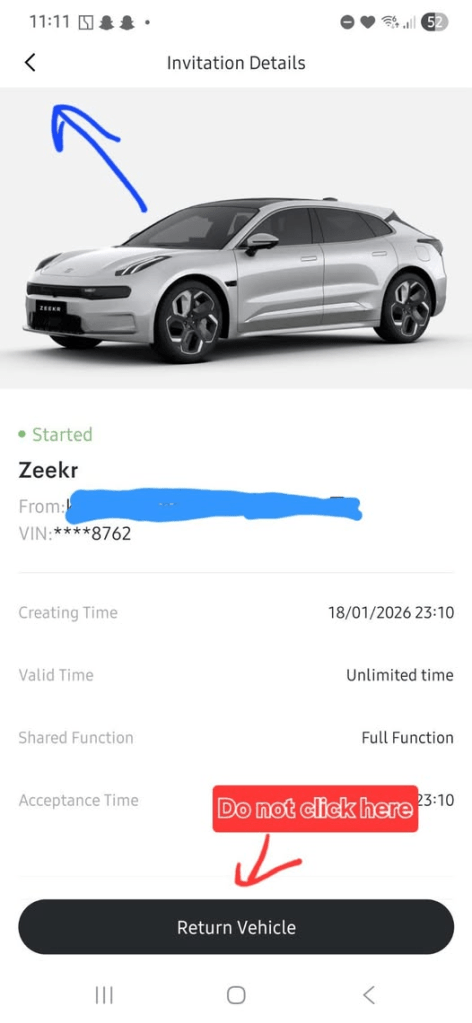
 My Zeekr 7X
Leave a comment